 Set Up
Grading Periods
Set Up
Grading Periods Set Up
Grading Periods
Set Up
Grading Periods and
select date.
and
select date.
 on the Grading Periods bar.
A new line displays. and
select date.
on the Grading Periods bar.
A new line displays. and
select date. on
the line of the Grading Period record to remove. The row is removed.
on
the line of the Grading Period record to remove. The row is removed. .New Blank
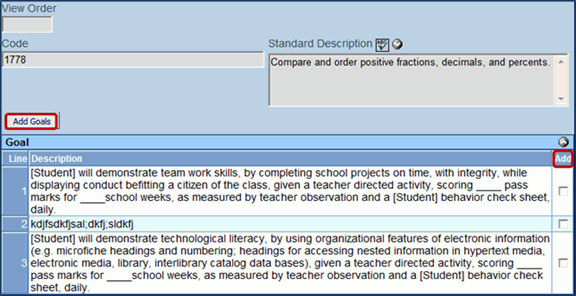
Goal
.New Blank
Goal and select.
 . A new row is
now added to the Goals section.
. A new row is
now added to the Goals section. 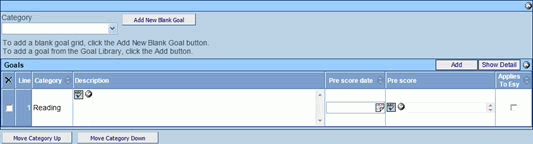
 to
spellcheck.
to
spellcheck.  for
more space. and
select date. on
the line of the goal record to remove. The row is removed.
for
more space. and
select date. on
the line of the goal record to remove. The row is removed. . The detail
view displays on the right. on the Short-term
Objectives/Benchmarks bar. A new line is added.. to spellcheck.
for
more space. and select
date when the student will meet the Short-Term Objective/Benchmark. on
the line of the Short-Terms Objective to remove. The row is removed.
. The detail
view displays on the right. on the Short-term
Objectives/Benchmarks bar. A new line is added.. to spellcheck.
for
more space. and select
date when the student will meet the Short-Term Objective/Benchmark. on
the line of the Short-Terms Objective to remove. The row is removed. to close the
detailed view. Goal
Library on the Goals
bar. The Goal Library Search screen opens. and select. and select.
to close the
detailed view. Goal
Library on the Goals
bar. The Goal Library Search screen opens. and select. and select. . The goals matching
the criteria selected displays.
. The goals matching
the criteria selected displays.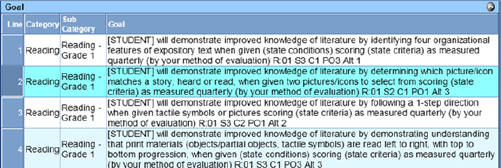
 to add the selected
goal to the student’s IEP. A pop-up window displays containing
the goal and stating that the goal has been added successfully
to the IEP.
to add the selected
goal to the student’s IEP. A pop-up window displays containing
the goal and stating that the goal has been added successfully
to the IEP.  . to spellcheck.
for
more space.. The detail
view displays on the right. on the Short-term
Objectives/Benchmarks bar. A new line is added.. to spellcheck.
for
more space. and select
date when the student will meet the Short-Term Objective/Benchmark. on
the line of the Short-Terms Objective to remove. The row is removed. to close the
detailed view. Personal
Goal Library. The detail
view displays on the right.
. to spellcheck.
for
more space.. The detail
view displays on the right. on the Short-term
Objectives/Benchmarks bar. A new line is added.. to spellcheck.
for
more space. and select
date when the student will meet the Short-Term Objective/Benchmark. on
the line of the Short-Terms Objective to remove. The row is removed. to close the
detailed view. Personal
Goal Library. The detail
view displays on the right. .The Goal Personal
Library window opens allowing you to edit the goal selected. State
Standards and Benchmarks may be added in this section to allow
for easier goal adding.. on the Goals
bar. The Goal Library Search screen opens. and select.
.The Goal Personal
Library window opens allowing you to edit the goal selected. State
Standards and Benchmarks may be added in this section to allow
for easier goal adding.. on the Goals
bar. The Goal Library Search screen opens. and select.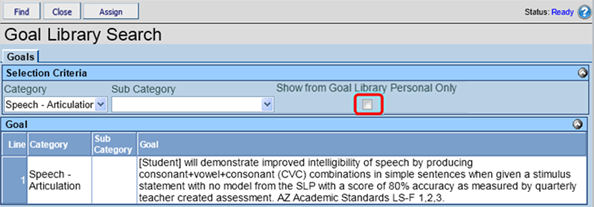 The goals matching
the criteria selected displays to add
the selected goal to the student’s IEP..
The Goal Library Search Window will remain open allowing for additional
goals to be added. .
The detail view displays on the right. on the Short-term
Objectives/Benchmarks bar. A new line is added.. to spellcheck.
for more
space. and
select date, of when the student will meet the Short-Term Objective/Benchmark.
on the line of the Short-Terms Objective to remove. The row is
removed. to close the
detailed view.Goal
Builder and select.
The goals matching
the criteria selected displays to add
the selected goal to the student’s IEP..
The Goal Library Search Window will remain open allowing for additional
goals to be added. .
The detail view displays on the right. on the Short-term
Objectives/Benchmarks bar. A new line is added.. to spellcheck.
for more
space. and
select date, of when the student will meet the Short-Term Objective/Benchmark.
on the line of the Short-Terms Objective to remove. The row is
removed. to close the
detailed view.Goal
Builder and select. . The goal builder
automatically combines the entered information into a complete
goal in the Goals Section.Standard
Goal Library and select the standard area for the goal. and select
level of the standard to add. and
select.
. The goal builder
automatically combines the entered information into a complete
goal in the Goals Section.Standard
Goal Library and select the standard area for the goal. and select
level of the standard to add. and
select. .
The Standard window will open.
.
The Standard window will open. next
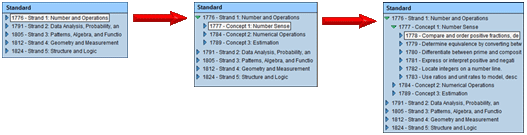
to the desired standard. The performance objectives display
below and turns to
next
to the desired standard. The performance objectives display
below and turns to  .
.
 to close the message..