 Complete
the Team Members Tab
Complete
the Team Members Tab Complete
the Team Members Tab
Complete
the Team Members Tab and select date. This
should reflect the date the document was created.
and select date. This
should reflect the date the document was created.
 next to the Staff
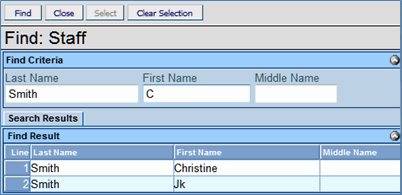
Name to change. The Find: Staff screen displays.
next to the Staff
Name to change. The Find: Staff screen displays. or press ENTER. Search Results
displays a list of matching criteria.
or press ENTER. Search Results
displays a list of matching criteria. .
Find: Staff screen closes and staff name displays.
.
Find: Staff screen closes and staff name displays.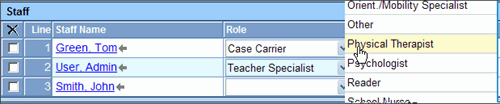
 and select the staff role.
 on the Staff bar. A new line
is added to the grid.
on the Staff bar. A new line
is added to the grid. on the line of the staff name to remove. The row is removed. on the Other Participants bar.
A new row will be added.
on the line of the staff name to remove. The row is removed.
on the line of the staff name to remove. The row is removed. on the Other Participants bar.
A new row will be added.
on the line of the staff name to remove. The row is removed.  to spellcheck.
  for more space.