 GENAZ
56 Eligibility Determination - Autism
GENAZ
56 Eligibility Determination - Autism GENAZ
56 Eligibility Determination - Autism
GENAZ
56 Eligibility Determination - Autism and select date. This
should reflect the date the document was created.
and select date. This
should reflect the date the document was created. to spellcheck.
  for more space.
 and
select date.
and
select date.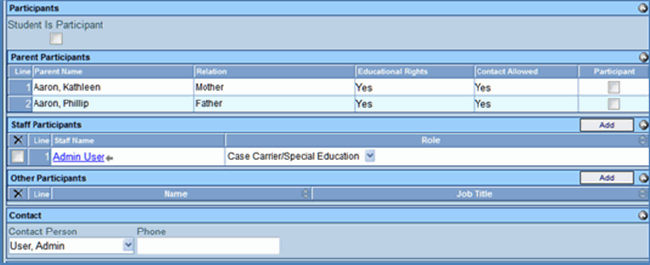

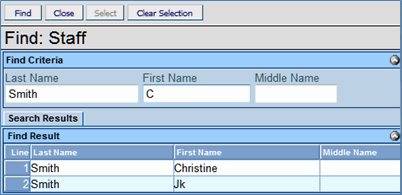
 next to the Staff
Name to change. The Find: Staff screen displays.
next to the Staff
Name to change. The Find: Staff screen displays. or press ENTER. Search Results
displays a list of matching criteria.
or press ENTER. Search Results
displays a list of matching criteria. .
Find: Staff screen closes and staff name displays.
.
Find: Staff screen closes and staff name displays.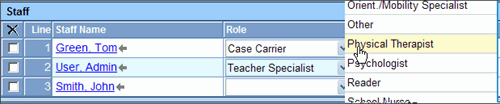
 and select the staff role.
 on the Staff bar. A new line
is added to the grid.
on the Staff bar. A new line
is added to the grid. on the line of the staff name to remove. The row is removed. on the Other Participants bar.
A new row will be added.
on the line of the staff name to remove. The row is removed. to spellcheck. for more space. displays staff member names from the Staff
Participants list. Select the appropriate staff participant's
name to display as the Contact Person.
on the line of the staff name to remove. The row is removed. on the Other Participants bar.
A new row will be added.
on the line of the staff name to remove. The row is removed. to spellcheck. for more space. displays staff member names from the Staff
Participants list. Select the appropriate staff participant's
name to display as the Contact Person. .GENAZ
57 Eligibility Determination - Emotional Disability and select date. This
should reflect the date the document was created. to spellcheck. for more space. and
select date. next to the Staff
Name to change. The Find: Staff screen displays. or press ENTER. Search Results
displays a list of matching criteria..
Find: Staff screen closes and staff name displays. and select the staff role. on the Staff bar. A new line
is added to the grid.
on the line of the staff name to remove. The row is removed. on the Other Participants bar.
A new row will be added.
on the line of the staff name to remove. The row is removed. to spellcheck. for more space. displays staff member names from the Staff
Participants list. Select the appropriate staff participant's
name to display as the Contact Person..GENAZ
58 Eligibility Determination - Hearing Impairment and select date. This
should reflect the date the document was created. to spellcheck. for more space. and
select date. next to the Staff
Name to change. The Find: Staff screen displays. or press ENTER. Search Results
displays a list of matching criteria..
Find: Staff screen closes and staff name displays. and select the staff role. on the Staff bar. A new line
is added to the grid.
on the line of the staff name to remove. The row is removed. on the Other Participants bar.
A new row will be added.
on the line of the staff name to remove. The row is removed. to spellcheck. for more space. displays staff member names from the Staff
Participants list. Select the appropriate staff participant's
name to display as the Contact Person..GENAZ
59 Eligibility Determination - Intellectual Disability and select date. This
should reflect the date the document was created. to spellcheck. for more space. and make the appropriate selection. and
select date. next to the Staff
Name to change. The Find: Staff screen displays. or press ENTER. Search Results
displays a list of matching criteria..
Find: Staff screen closes and staff name displays. and select the staff role. on the Staff bar. A new line
is added to the grid.
on the line of the staff name to remove. The row is removed. on the Other Participants bar.
A new row will be added.
on the line of the staff name to remove. The row is removed. to spellcheck. for more space. displays staff member names from the Staff
Participants list. Select the appropriate staff participant's
name to display as the Contact Person..GENAZ
60 Eligibility Determination - Multiple Disabilities / SSI and select date. This
should reflect the date the document was created. to spellcheck. for more space. and
select date. next to the Staff
Name to change. The Find: Staff screen displays. or press ENTER. Search Results
displays a list of matching criteria..
Find: Staff screen closes and staff name displays. and select the staff role. on the Staff bar. A new line
is added to the grid.
on the line of the staff name to remove. The row is removed. on the Other Participants bar.
A new row will be added.
on the line of the staff name to remove. The row is removed. to spellcheck. for more space. displays staff member names from the Staff
Participants list. Select the appropriate staff participant's
name to display as the Contact Person..GENAZ
61 Eligibility Determination - Other Health Impairment and select date. This
should reflect the date the document was created. to spellcheck. for more space. and
select date. next to the Staff
Name to change. The Find: Staff screen displays. or press ENTER. Search Results
displays a list of matching criteria..
Find: Staff screen closes and staff name displays. and select the staff role. on the Staff bar. A new line
is added to the grid.
on the line of the staff name to remove. The row is removed. on the Other Participants bar.
A new row will be added.
on the line of the staff name to remove. The row is removed. to spellcheck. for more space. displays staff member names from the Staff
Participants list. Select the appropriate staff participant's
name to display as the Contact Person..GENAZ
63 Eligibility Determination - Orthopedic Impairment and select date. This
should reflect the date the document was created. to spellcheck. for more space. and
select date. next to the Staff
Name to change. The Find: Staff screen displays. or press ENTER. Search Results
displays a list of matching criteria..
Find: Staff screen closes and staff name displays. and select the staff role. on the Staff bar. A new line
is added to the grid.
on the line of the staff name to remove. The row is removed. on the Other Participants bar.
A new row will be added.
on the line of the staff name to remove. The row is removed. to spellcheck. for more space. displays staff member names from the Staff
Participants list. Select the appropriate staff participant's
name to display as the Contact Person..GENAZ
64A Eligibility Determination - Developmental Delay and select date. This
should reflect the date the document was created. to spellcheck. for more space. and
select date. next to the Staff
Name to change. The Find: Staff screen displays. or press ENTER. Search Results
displays a list of matching criteria..
Find: Staff screen closes and staff name displays. and select the staff role. on the Staff bar. A new line
is added to the grid.
on the line of the staff name to remove. The row is removed. on the Other Participants bar.
A new row will be added.
on the line of the staff name to remove. The row is removed. to spellcheck. for more space. displays staff member names from the Staff
Participants list. Select the appropriate staff participant's
name to display as the Contact Person..GENAZ
64 Eligibility Determination - Preschool Severe Delay and select date. This
should reflect the date the document was created. to spellcheck. for more space. and
select date. next to the Staff
Name to change. The Find: Staff screen displays. or press ENTER. Search Results
displays a list of matching criteria..
Find: Staff screen closes and staff name displays. and select the staff role. on the Staff bar. A new line
is added to the grid.
on the line of the staff name to remove. The row is removed. on the Other Participants bar.
A new row will be added.
on the line of the staff name to remove. The row is removed. to spellcheck. for more space. displays staff member names from the Staff
Participants list. Select the appropriate staff participant's
name to display as the Contact Person..GENAZ
65 Eligibility Determination - Specific Learning Disability and select date. This
should reflect the date the document was created. to spellcheck. for more space. and
select date.
.GENAZ
57 Eligibility Determination - Emotional Disability and select date. This
should reflect the date the document was created. to spellcheck. for more space. and
select date. next to the Staff
Name to change. The Find: Staff screen displays. or press ENTER. Search Results
displays a list of matching criteria..
Find: Staff screen closes and staff name displays. and select the staff role. on the Staff bar. A new line
is added to the grid.
on the line of the staff name to remove. The row is removed. on the Other Participants bar.
A new row will be added.
on the line of the staff name to remove. The row is removed. to spellcheck. for more space. displays staff member names from the Staff
Participants list. Select the appropriate staff participant's
name to display as the Contact Person..GENAZ
58 Eligibility Determination - Hearing Impairment and select date. This
should reflect the date the document was created. to spellcheck. for more space. and
select date. next to the Staff
Name to change. The Find: Staff screen displays. or press ENTER. Search Results
displays a list of matching criteria..
Find: Staff screen closes and staff name displays. and select the staff role. on the Staff bar. A new line
is added to the grid.
on the line of the staff name to remove. The row is removed. on the Other Participants bar.
A new row will be added.
on the line of the staff name to remove. The row is removed. to spellcheck. for more space. displays staff member names from the Staff
Participants list. Select the appropriate staff participant's
name to display as the Contact Person..GENAZ
59 Eligibility Determination - Intellectual Disability and select date. This
should reflect the date the document was created. to spellcheck. for more space. and make the appropriate selection. and
select date. next to the Staff
Name to change. The Find: Staff screen displays. or press ENTER. Search Results
displays a list of matching criteria..
Find: Staff screen closes and staff name displays. and select the staff role. on the Staff bar. A new line
is added to the grid.
on the line of the staff name to remove. The row is removed. on the Other Participants bar.
A new row will be added.
on the line of the staff name to remove. The row is removed. to spellcheck. for more space. displays staff member names from the Staff
Participants list. Select the appropriate staff participant's
name to display as the Contact Person..GENAZ
60 Eligibility Determination - Multiple Disabilities / SSI and select date. This
should reflect the date the document was created. to spellcheck. for more space. and
select date. next to the Staff
Name to change. The Find: Staff screen displays. or press ENTER. Search Results
displays a list of matching criteria..
Find: Staff screen closes and staff name displays. and select the staff role. on the Staff bar. A new line
is added to the grid.
on the line of the staff name to remove. The row is removed. on the Other Participants bar.
A new row will be added.
on the line of the staff name to remove. The row is removed. to spellcheck. for more space. displays staff member names from the Staff
Participants list. Select the appropriate staff participant's
name to display as the Contact Person..GENAZ
61 Eligibility Determination - Other Health Impairment and select date. This
should reflect the date the document was created. to spellcheck. for more space. and
select date. next to the Staff
Name to change. The Find: Staff screen displays. or press ENTER. Search Results
displays a list of matching criteria..
Find: Staff screen closes and staff name displays. and select the staff role. on the Staff bar. A new line
is added to the grid.
on the line of the staff name to remove. The row is removed. on the Other Participants bar.
A new row will be added.
on the line of the staff name to remove. The row is removed. to spellcheck. for more space. displays staff member names from the Staff
Participants list. Select the appropriate staff participant's
name to display as the Contact Person..GENAZ
63 Eligibility Determination - Orthopedic Impairment and select date. This
should reflect the date the document was created. to spellcheck. for more space. and
select date. next to the Staff
Name to change. The Find: Staff screen displays. or press ENTER. Search Results
displays a list of matching criteria..
Find: Staff screen closes and staff name displays. and select the staff role. on the Staff bar. A new line
is added to the grid.
on the line of the staff name to remove. The row is removed. on the Other Participants bar.
A new row will be added.
on the line of the staff name to remove. The row is removed. to spellcheck. for more space. displays staff member names from the Staff
Participants list. Select the appropriate staff participant's
name to display as the Contact Person..GENAZ
64A Eligibility Determination - Developmental Delay and select date. This
should reflect the date the document was created. to spellcheck. for more space. and
select date. next to the Staff
Name to change. The Find: Staff screen displays. or press ENTER. Search Results
displays a list of matching criteria..
Find: Staff screen closes and staff name displays. and select the staff role. on the Staff bar. A new line
is added to the grid.
on the line of the staff name to remove. The row is removed. on the Other Participants bar.
A new row will be added.
on the line of the staff name to remove. The row is removed. to spellcheck. for more space. displays staff member names from the Staff
Participants list. Select the appropriate staff participant's
name to display as the Contact Person..GENAZ
64 Eligibility Determination - Preschool Severe Delay and select date. This
should reflect the date the document was created. to spellcheck. for more space. and
select date. next to the Staff
Name to change. The Find: Staff screen displays. or press ENTER. Search Results
displays a list of matching criteria..
Find: Staff screen closes and staff name displays. and select the staff role. on the Staff bar. A new line
is added to the grid.
on the line of the staff name to remove. The row is removed. on the Other Participants bar.
A new row will be added.
on the line of the staff name to remove. The row is removed. to spellcheck. for more space. displays staff member names from the Staff
Participants list. Select the appropriate staff participant's
name to display as the Contact Person..GENAZ
65 Eligibility Determination - Specific Learning Disability and select date. This
should reflect the date the document was created. to spellcheck. for more space. and
select date. and select whether the student Agrees
or Disagrees with this
eligibility determination.
and select whether the student Agrees
or Disagrees with this
eligibility determination. and make the appropriate selection. next to the Staff
Name to change. The Find: Staff screen displays. or press ENTER. Search Results
displays a list of matching criteria..
Find: Staff screen closes and staff name displays. and select the staff role. and make the appropriate selection. on the Staff bar. A new line
is added to the grid.
on the line of the staff name to remove. The row is removed. on the Other Participants bar.
A new row will be added. and make the appropriate selection.
on the line of the staff name to remove. The row is removed. to spellcheck. for more space. displays staff member names from the Staff
Participants list. Select the appropriate staff participant's
name to display as the Contact Person..GENAZ
66 Eligibility Determination - Speech/Language Impairment and select date. This
should reflect the date the document was created. to spellcheck. for more space.
and make the appropriate selection. next to the Staff
Name to change. The Find: Staff screen displays. or press ENTER. Search Results
displays a list of matching criteria..
Find: Staff screen closes and staff name displays. and select the staff role. and make the appropriate selection. on the Staff bar. A new line
is added to the grid.
on the line of the staff name to remove. The row is removed. on the Other Participants bar.
A new row will be added. and make the appropriate selection.
on the line of the staff name to remove. The row is removed. to spellcheck. for more space. displays staff member names from the Staff
Participants list. Select the appropriate staff participant's
name to display as the Contact Person..GENAZ
66 Eligibility Determination - Speech/Language Impairment and select date. This
should reflect the date the document was created. to spellcheck. for more space. and
select date. next to the Staff
Name to change. The Find: Staff screen displays. or press ENTER. Search Results
displays a list of matching criteria..
Find: Staff screen closes and staff name displays. and select the staff role. on the Staff bar. A new line
is added to the grid.
on the line of the staff name to remove. The row is removed. on the Other Participants bar.
A new row will be added.
on the line of the staff name to remove. The row is removed. to spellcheck. for more space. displays staff member names from the Staff
Participants list. Select the appropriate staff participant's
name to display as the Contact Person..GENAZ
67 Eligibility Determination - Traumatic Brain Injury and select date. This
should reflect the date the document was created. to spellcheck. for more space. and
select date. next to the Staff
Name to change. The Find: Staff screen displays. or press ENTER. Search Results
displays a list of matching criteria..
Find: Staff screen closes and staff name displays. and select the staff role. on the Staff bar. A new line
is added to the grid.
on the line of the staff name to remove. The row is removed. on the Other Participants bar.
A new row will be added.
on the line of the staff name to remove. The row is removed. to spellcheck. for more space. displays staff member names from the Staff
Participants list. Select the appropriate staff participant's
name to display as the Contact Person..GENAZ
68 Eligibility Determination - Visual Impairment and select date. This
should reflect the date the document was created. to spellcheck. for more space. and
select date. next to the Staff
Name to change. The Find: Staff screen displays. or press ENTER. Search Results
displays a list of matching criteria..
Find: Staff screen closes and staff name displays. and select the staff role. on the Staff bar. A new line
is added to the grid.
on the line of the staff name to remove. The row is removed. on the Other Participants bar.
A new row will be added.
on the line of the staff name to remove. The row is removed. to spellcheck. for more space. displays staff member names from the Staff
Participants list. Select the appropriate staff participant's
name to display as the Contact Person..GENAZ
69 Eligibility Determination - Non Eligible Child and select date. This
should reflect the date the document was created. to spellcheck. for more space. and
select date. next to the Staff
Name to change. The Find: Staff screen displays. or press ENTER. Search Results
displays a list of matching criteria..
Find: Staff screen closes and staff name displays. and select the staff role. on the Staff bar. A new line
is added to the grid.
on the line of the staff name to remove. The row is removed. on the Other Participants bar.
A new row will be added.
on the line of the staff name to remove. The row is removed. to spellcheck. for more space. displays staff member names from the Staff
Participants list. Select the appropriate staff participant's
name to display as the Contact Person..
and
select date. next to the Staff
Name to change. The Find: Staff screen displays. or press ENTER. Search Results
displays a list of matching criteria..
Find: Staff screen closes and staff name displays. and select the staff role. on the Staff bar. A new line
is added to the grid.
on the line of the staff name to remove. The row is removed. on the Other Participants bar.
A new row will be added.
on the line of the staff name to remove. The row is removed. to spellcheck. for more space. displays staff member names from the Staff
Participants list. Select the appropriate staff participant's
name to display as the Contact Person..GENAZ
67 Eligibility Determination - Traumatic Brain Injury and select date. This
should reflect the date the document was created. to spellcheck. for more space. and
select date. next to the Staff
Name to change. The Find: Staff screen displays. or press ENTER. Search Results
displays a list of matching criteria..
Find: Staff screen closes and staff name displays. and select the staff role. on the Staff bar. A new line
is added to the grid.
on the line of the staff name to remove. The row is removed. on the Other Participants bar.
A new row will be added.
on the line of the staff name to remove. The row is removed. to spellcheck. for more space. displays staff member names from the Staff
Participants list. Select the appropriate staff participant's
name to display as the Contact Person..GENAZ
68 Eligibility Determination - Visual Impairment and select date. This
should reflect the date the document was created. to spellcheck. for more space. and
select date. next to the Staff
Name to change. The Find: Staff screen displays. or press ENTER. Search Results
displays a list of matching criteria..
Find: Staff screen closes and staff name displays. and select the staff role. on the Staff bar. A new line
is added to the grid.
on the line of the staff name to remove. The row is removed. on the Other Participants bar.
A new row will be added.
on the line of the staff name to remove. The row is removed. to spellcheck. for more space. displays staff member names from the Staff
Participants list. Select the appropriate staff participant's
name to display as the Contact Person..GENAZ
69 Eligibility Determination - Non Eligible Child and select date. This
should reflect the date the document was created. to spellcheck. for more space. and
select date. next to the Staff
Name to change. The Find: Staff screen displays. or press ENTER. Search Results
displays a list of matching criteria..
Find: Staff screen closes and staff name displays. and select the staff role. on the Staff bar. A new line
is added to the grid.
on the line of the staff name to remove. The row is removed. on the Other Participants bar.
A new row will be added.
on the line of the staff name to remove. The row is removed. to spellcheck. for more space. displays staff member names from the Staff
Participants list. Select the appropriate staff participant's
name to display as the Contact Person..