The Demographics tab is divided into several Group Boxes. Based on
a user’s security setup, some group boxes or data fields may be hidden
or made to be view only. All of the demographic data imports in from Synergy
SIS (or a district’s student information system database).
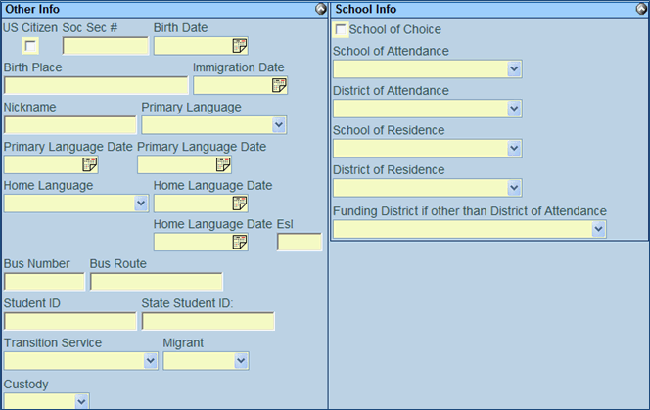
The Other Info Group Box includes Social Security number and Birth Date along with a field
to enter a student’s Nickname.
The Primary
and Home Language drop
down fields as well as the Primary
Language Date and Home
Language Date fields will import into the special education
documents.
English as a Second Language (ESL)
is listed along with BusRoute information.
The student’s unique district Student
ID is shown along with the State
Student ID.
Transition
Service drop down information is available for students
Migrant
and Custody flags are
shown
The School Info group box contains a School of Choice check box
The School of Attendance drop down indicates
the school the student attends. This field will import into the
special education documents.
The District
of Attendance indicates the district the student attends.
The School
of Residence drop down shows the school assigned to the
student based on their home address. This field will import into
the special education documents.
The District
of Residence indicates the student’s district based on
the home address.
If another district is funding the student’s
attendance it can be added to the Funding
District drop down.
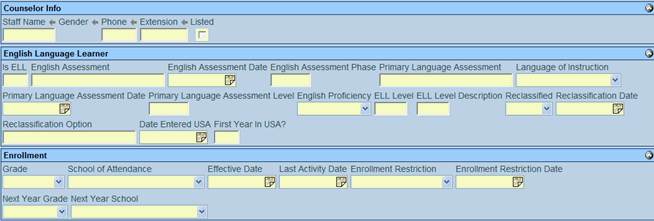
If a student has an assigned counselor,
the Counselor Info Group Box may be used. This box includes Staff Name (Counselor), Gender and Phone
number, Extension if any,
and whether the number is Listed.
The English Language Learner Group Box may
be used to view or enter ELL information.
Is ELL specifies whether a student is an ELL student. The
English Assessment scores
and Dates are shown along
with the Primary Language Assessment
and Language of Instruction.English Proficiency Level
is available as well as Reclassification
information. There is also a Date
Entered USA and a First
Year in USA? field.
The Enrollment Group Box indicates the students
current Grade and School of Attendance along with
the Effective Date and
Last Activity Date. If
the student has any Enrollment
Restriction they will be displayed as well as Enrollment
Restriction Date.Next
Year Grade and School
are also shown.
 Home
and Mailing Address
Home
and Mailing Address
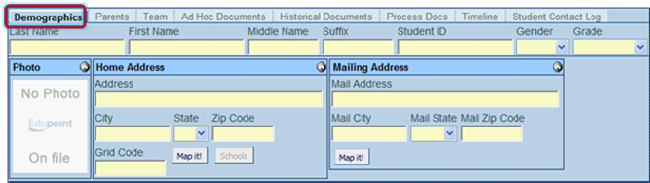
 button to
view the address location on a map.
button to
view the address location on a map. button to
view the schools of boundary for that address.
button to
view the schools of boundary for that address.