 Import
State Standards from TeacherVUE Grade Book
Import
State Standards from TeacherVUE Grade Book Import
State Standards from TeacherVUE Grade Book
Import
State Standards from TeacherVUE Grade Book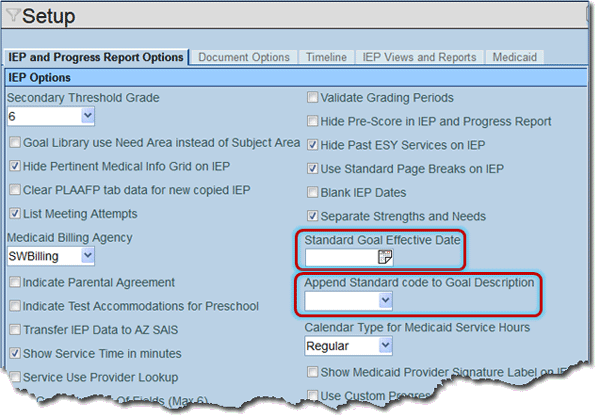
 and
select date. This date will determine when the new Goal Structure
display in the IEPs. IEPs currently being drafted will not be
affected.
and
select date. This date will determine when the new Goal Structure
display in the IEPs. IEPs currently being drafted will not be
affected. and
select Suffix, Prefix,
or None.
and
select Suffix, Prefix,
or None. .
.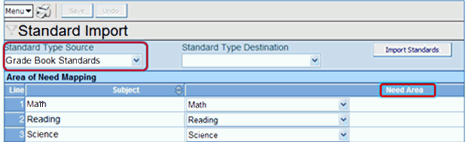 . The Standard Type
Destination can be left blank. A destination will be created when
standards are imported. .This drop-down list
is generated from System>Special Education>Area of Need
Setup. The current Need Area list will most likely need to be
modified to align appropriately with the standard subjects. Only
one Need Area can be selected for each Subject..Attach
Goals To Imported Standards, Grade ,
and Need Area , and select.
. The Standard Type
Destination can be left blank. A destination will be created when
standards are imported. .This drop-down list
is generated from System>Special Education>Area of Need
Setup. The current Need Area list will most likely need to be
modified to align appropriately with the standard subjects. Only
one Need Area can be selected for each Subject..Attach
Goals To Imported Standards, Grade ,
and Need Area , and select. .
.
 . A new
line displays on grid.
. A new
line displays on grid. to spell check. Click
  for more space.. Upload
Goals from Spreadsheet
for more space.. Upload
Goals from Spreadsheet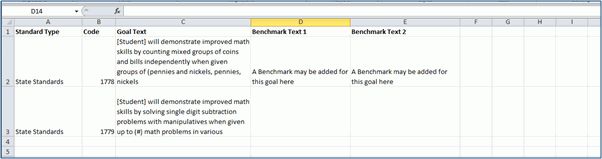 to browse, locate
and upload the spreadsheet..
to browse, locate
and upload the spreadsheet.. . The
goals listed in the spreadsheet should now be attached to the
appropriate standard.Add Goals
to IEP
. The
goals listed in the spreadsheet should now be attached to the
appropriate standard.Add Goals
to IEP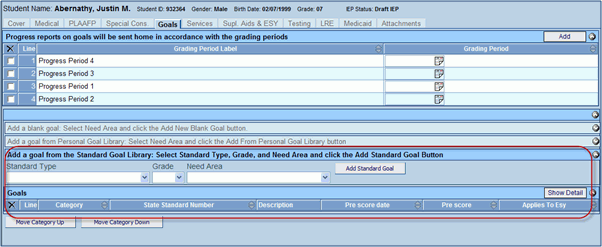 , Grade ,
and Need Area , and
select.
, Grade ,
and Need Area , and
select. . The
standards that have been aligned with the selected Need Area will
display.
. The
standards that have been aligned with the selected Need Area will
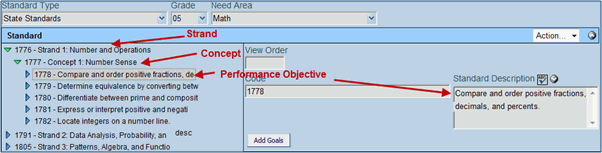
display. to expand the Strand, then Concept,
then Performance Objective.
If a goal is aligned with the selected Performance Objective in
the Standard Goal Import, it will display.
to expand the Strand, then Concept,
then Performance Objective.
If a goal is aligned with the selected Performance Objective in
the Standard Goal Import, it will display. . A message
confirming the selected goal has been assigned to the IEP appears. when
finished adding goals.
. A message
confirming the selected goal has been assigned to the IEP appears. when
finished adding goals.