Portfolio
Screen
Portfolio
Screen Portfolio
Screen
Portfolio
Screen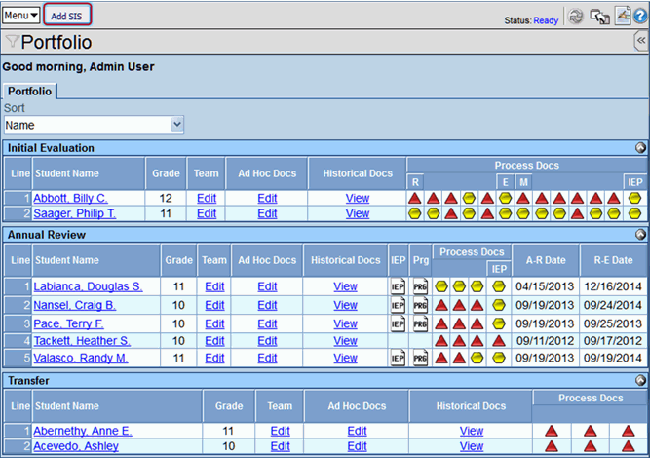
 The Add SIS button at
the top of the screen,opens the StudentSISFind screen in a new
window. This screen imports students not currently in the special
education process into the Synergy SE program from Synergy SIS
(or the district’s student information system database). See:
Importing a Student from Synergy SIS.
The Add SIS button at
the top of the screen,opens the StudentSISFind screen in a new
window. This screen imports students not currently in the special
education process into the Synergy SE program from Synergy SIS
(or the district’s student information system database). See:
Importing a Student from Synergy SIS. The Edit
link in the Team column opens the student’s Team List in a separate
window. The Team List displays the student’s special education
team members. Team members are added and removed using this screen. The Edit
link in the Ad Hoc Docs column will open the list of Ad Hoc documents
for viewing, editing or creating.
The Edit
link in the Team column opens the student’s Team List in a separate
window. The Team List displays the student’s special education
team members. Team members are added and removed using this screen. The Edit
link in the Ad Hoc Docs column will open the list of Ad Hoc documents
for viewing, editing or creating.  The View
link in the Historical Docs column will open the list of Historical
documents for the student.
The View
link in the Historical Docs column will open the list of Historical
documents for the student.  If an IEP icon is available, the student has a current finalized
IEP that can be viewed.
If an IEP icon is available, the student has a current finalized
IEP that can be viewed. If a PRG icon is available, the student has a current Progress
Report that can be created, viewed or updated.
If a PRG icon is available, the student has a current Progress
Report that can be created, viewed or updated.